On July 13, developer A Green Being posted a screenshot of unified.json logs on the X platform, accusing xAI’s development tool Grok Build—owned by Musk—of packaging his entire user home directory and uploading it to xAI servers. The leaked contents included his personal SSH key, password manager database, personal files, photos, and videos—“everything has leaked.”
Evidence from A Green Being’s unified.json log screenshot
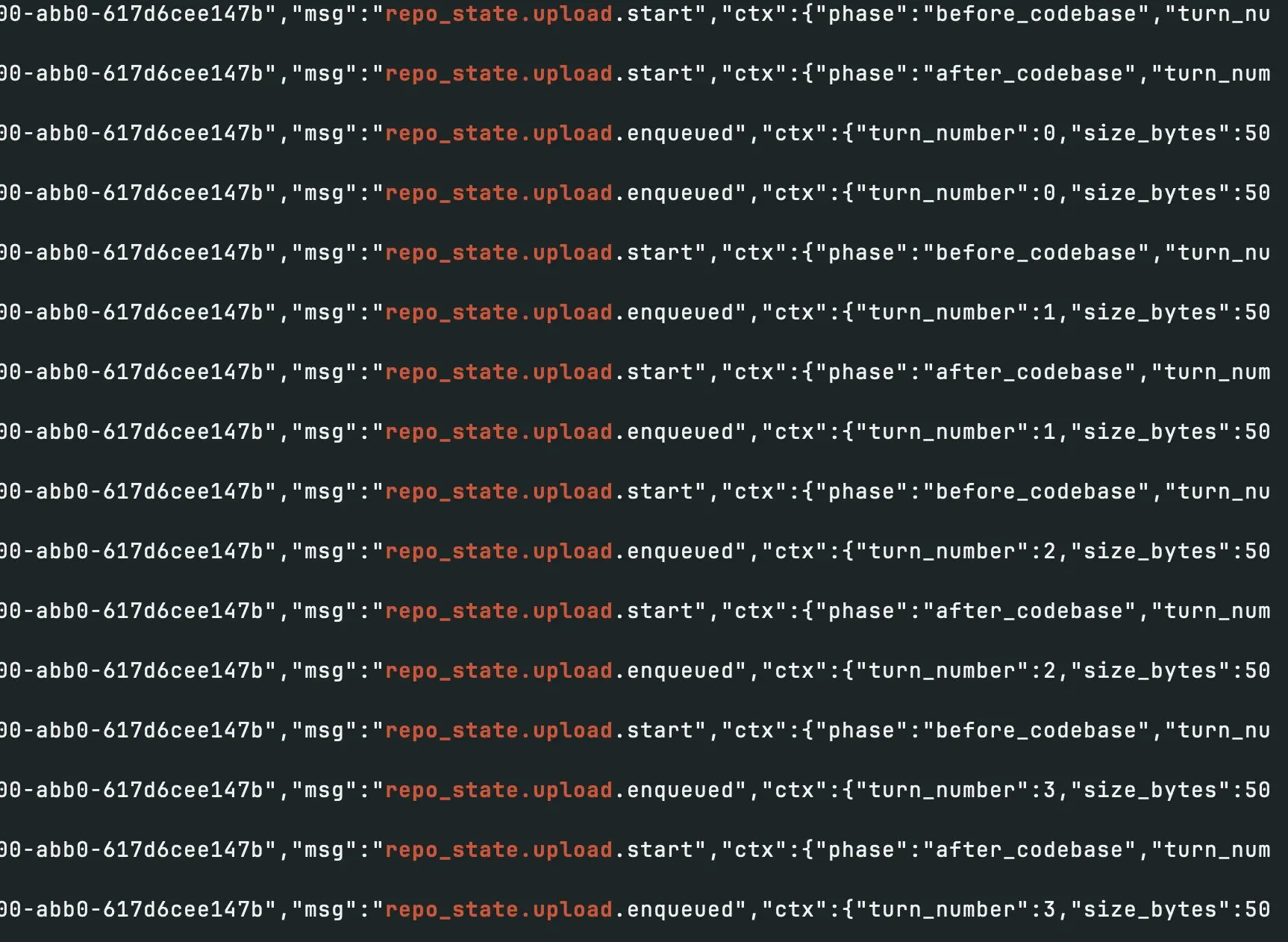
(Source: A Green Being)
According to the unified.json log screenshot shared by A Green Being on the X platform, the system indeed triggered numerous repo_state.upload.start requests, and the upload path directly pointed to that user’s home directory (/home/usuario). This indicates that Grok Build, without explicit file selection and exclusion, sent all local files containing highly sensitive information (SSH keys, password manager database, photos, videos) to xAI’s cloud endpoint.
A Green Being stated that the privacy disaster occurred because he mistakenly ran the Grok Build tool in the Home Directory. CyberSatoshi responded: “You’re worse off than me—you ran Grok directly in your home directory.”
Security advice: Absolutely avoid running in the home directory; use Sandbox and monitor log commands
Based on security experts’ recommendations, developers who have used or are considering using similar AI development tools such as Grok Build should take the following protective measures:
· Absolutely avoid running such AI tools in the home directory or the root directory
· Use an isolated environment: run in a separate virtual environment (Sandbox), a Docker container, or a dedicated restricted user account
· Actively monitor logs: use terminal commands (cat ~/.grok/logs/unified.json | grep repo_state.upload) to check for abnormal data upload activity
· Check historical logs immediately: if you have used Grok Build, review local Grok log files promptly to confirm whether data has been leaked
FAQ
Why would Grok Build upload an entire home directory instead of just project code?
Reports indicate that when Grok Build performs upload operations in the background, it lacks proper file exclusion mechanisms (such as automatically ignoring .gitignore or system hidden files). When users run the tool in the home directory, its underlying design treats the home directory as the entire “context environment” and uploads everything, rather than limiting uploads to code files. This is a double failure caused by both a design flaw in the tool and improper usage in the wrong location.
What specific risks did CyberSatoshi’s prior warning highlight?
Reports state that CyberSatoshi (@XBToshi) previously warned that Grok Build would quietly upload the entire repository in the background, including Git history and hidden files such as .env containing confidential information like API keys, all to Google Cloud Platform (GCP). He also noted that this data is highly likely to be used for subsequent model training; at the time, he urged developers to immediately review local Grok log files.
How can I immediately check whether my computer has uploaded data via Grok Build?
You can review logs using the following terminal command: cat ~/.grok/logs/unified.json | grep repo\_state.upload. If the logs show numerous repo\_state.upload.start entries and the upload path points to the home or root directory, it indicates data has been sent to the cloud. It is recommended to stop using Grok Build in a non-isolated environment immediately and assess whether sensitive information (SSH keys, API keys) needs to be replaced right away.


