Constellation Energy (CEG) is listed on Nasdaq, focusing on nuclear power assets, electricity markets, and retail customers. When trading CEG on Gate Stocks, all actions must be performed directly on the platform: name, ticker, market, order type, available balance, fee rules, and trading status must each be confirmed individually.
Before placing an order, it's essential to distinguish between company fundamentals and platform trading rules. The CEG business model outlines how nuclear power assets, wholesale electricity markets, and long-term PPAs shape the revenue structure. These should not be confused with order types, fee fields, or available USDT balance.
A more reliable workflow is to first confirm whether your account and USDT are eligible for stock orders, then search for Constellation Energy using the ticker CEG, select your preferred order type, and review the transaction record. This sequence helps minimize common issues such as incorrect ticker selection, inconsistent funding sources, misinterpretation of order types, and unconfirmed holdings after execution.
What should you prepare before buying or trading CEG on Gate Stocks?
Prior to trading CEG with USDT, verify account status, identity authentication, stock trading permissions, available USDT, product availability, and regional access requirements. Different accounts and regions may have varying platform rules, so always rely on the features displayed on the Gate Stocks page.
The purpose of the preparation phase is not to place an order, but to eliminate fundamental issues such as inability to trade, unavailable funds, ticker confusion, and misinterpretation of fees. If any preparation item is unclear, you may later encounter situations like “able to view quotes but unable to submit orders” or “order amount does not match available balance.”
| Preparation Item |
What to Check |
Common Impact |
| Account Permissions |
Whether Stocks / U.S. stock trading is enabled |
Affects ability to submit orders |
| USDT Funds |
Whether available USDT has been transferred to the stock account |
Affects order amount and tradable quantity |
| Product Availability |
Whether the CEG page shows tradable status |
Affects ability to submit orders |
| Asset Identification |
Whether name, ticker CEG, and market info match |
Affects selection of correct stock |
| Fee Rules |
Fees, minimum unit, settlement standards |
Affects execution and holding records |
The preparation checklist separates “ability to view the page” from “ability to submit orders.” Only when account, permissions, funds, product status, and fee rules are clear can you proceed with searching and order placement.
Step 1: How to prepare USDT and your stock trading account?
Trading U.S. stocks on Gate Stocks usually requires checking account status, completing identity verification, confirming stock trading permissions, and preparing USDT for the stock account. Available USDT may differ from your spot account balance, so confirm your funds are accessible for stock orders before trading.
Fund preparation also involves monitoring network deposits, account transfers, available balance, and frozen amounts. If USDT is pending confirmation, transfer is incomplete, or occupied by other orders, the quantity available for purchase may be less than your total account balance.
Step 2: How to search for Constellation Energy (CEG) on Gate Stocks?
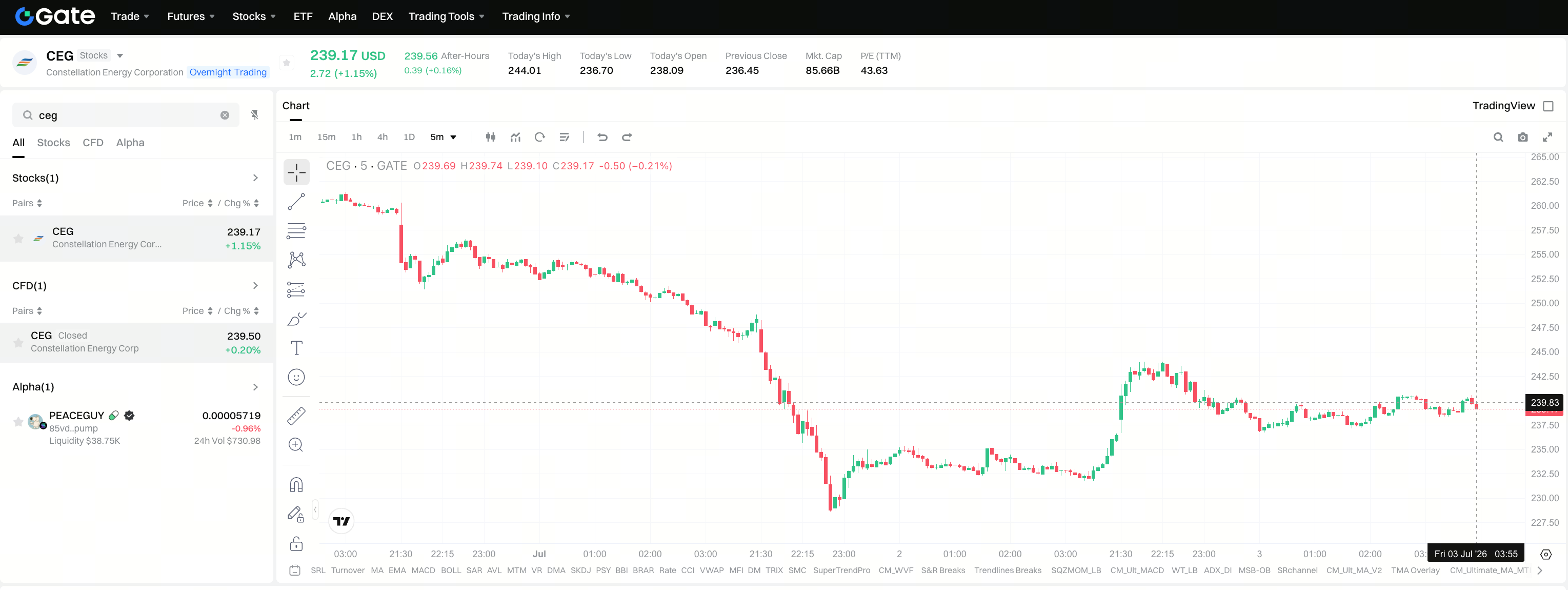
On the Gate Stocks page, enter CEG in the search box. The platform should display Constellation Energy Corporation or the corresponding stock name. Verifying the ticker and company name is the first line of defense, especially in the energy and utilities sector where several companies have similar names or business profiles.
If search results include other electricity, nuclear power, utility, or energy companies, prioritize confirmation using the ticker and full English company name. CEG should not be confused with Vistra, NextEra, Duke Energy, or other power stocks; CEG vs Vistra vs NextEra vs Duke differentiates peers by asset type and regulatory exposure. If only abbreviations are shown, confirm with both company name and market information.
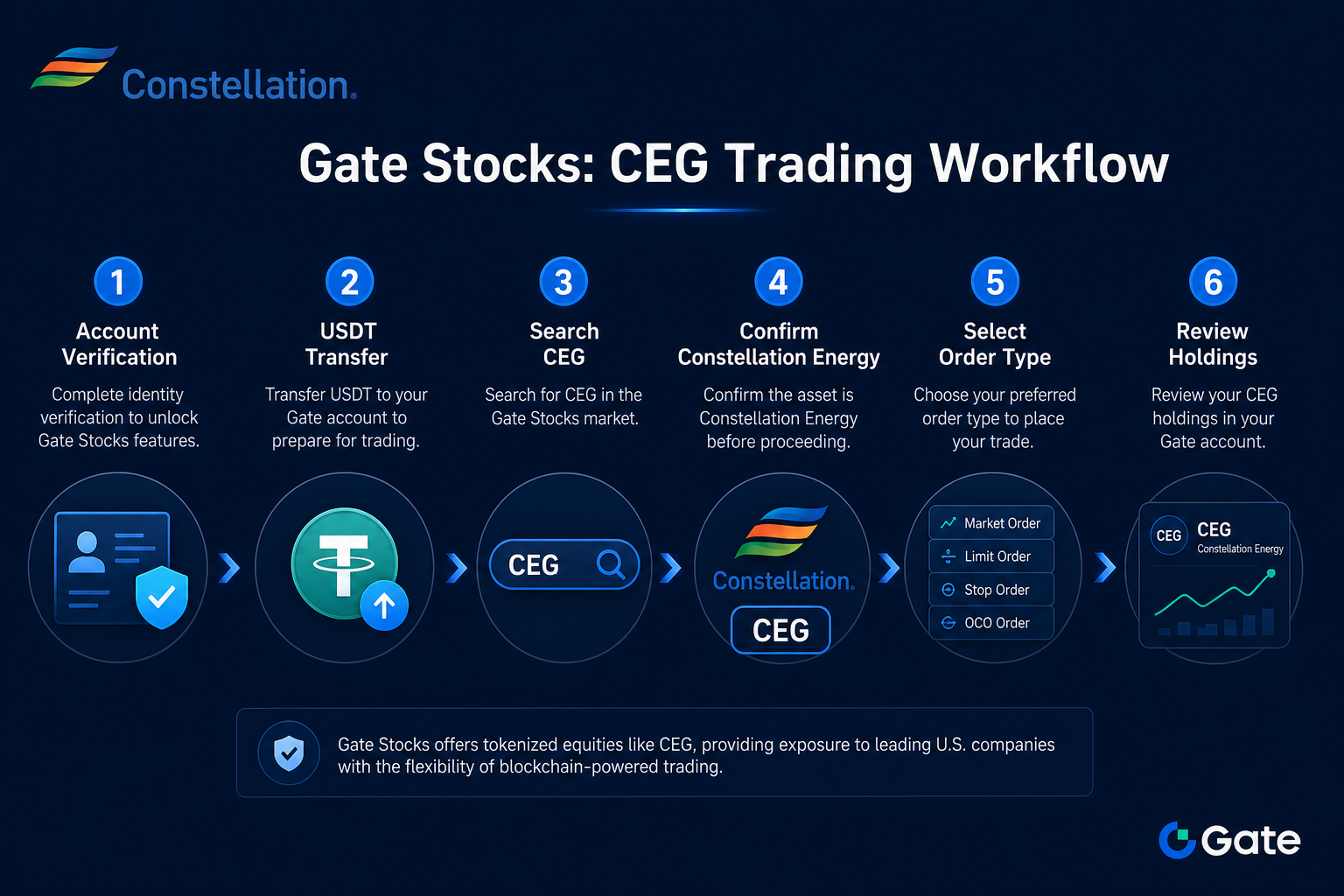
Figure 1. CEG trading workflow on Gate Stocks: account verification, USDT transfer, search for CEG, confirm Constellation Energy, select order type, and review holdings.
Step 3: How to place a buy or trade order for CEG?
After entering the CEG trading page, confirm order direction, order type, quantity or amount, estimated transaction amount, fees, and available account balance in sequence. Before submitting the order, verify the stock name and ticker again to avoid carrying identification errors into your transaction record.
Common order types include limit orders and market orders. Limit orders let you set price conditions, while market orders execute at the available market price. Neither order type is inherently superior; differences lie in execution logic, speed, and price control.
| Order Type |
Key Checks |
Possible Scenarios |
| Limit Order |
Price, quantity, valid status |
May not execute if price is not triggered |
| Market Order |
Available balance, liquidity |
Execution price may differ from estimate |
| Partial Fill |
Filled quantity, remaining order |
Holdings and available balance will update accordingly |
This table clarifies the differences between order types and order statuses. Before submitting, use the confirmation box, fee prompt, and order direction on the page as your final checkpoints.
What fees and order rules should you confirm when trading CEG?
The stock trading page usually displays fees, spread, execution price, minimum trading unit, trading hours, and relevant prompts. Product and regional rules may vary, so always rely on the information shown on the platform.
Besides fees, monitor order execution costs. Market orders may incur price differences due to liquidity, while limit orders may remain unexecuted if price conditions aren’t met. Fee rules, execution methods, and order status should be reviewed together.
| Check Item |
Meaning |
Why It Matters |
| Fees |
Transaction fees upon execution |
Affects amounts shown in confirmation |
| Spread |
Difference between buy and sell quotes |
Affects actual execution cost |
| Minimum Unit |
Smallest allowed trading quantity |
Determines order eligibility |
| Trading Hours |
Time window for trading the asset |
Affects order execution possibility |
This table breaks fees and order rules into four checkpoints. If the order page content doesn’t match your expectations, review quantity, price, fees, and trading status before deciding whether to proceed.
Step 4: How to review holdings and historical orders after execution?
After submitting an order, check status in current orders, historical orders, transaction records, or holdings page. If the order is unexecuted, it may be due to limit settings, market price, trading hours, or liquidity; if executed, verify average transaction price, quantity, fees, and holding amount.
Holdings review should also include ticker confirmation. CEG represents Constellation Energy, a U.S. company focused on electricity and nuclear power. The ticker in your holdings, order records, and asset details should match your intended target.
What risks should you understand before buying or trading CEG?
Trading process risks and company fundamentals should be considered separately. Trading risks include incorrect ticker selection, misinterpretation of order types, unclear fee rules, trading hour restrictions, and liquidity changes. Company risks stem from nuclear power operations, electricity market prices, PJM capacity market, long-term PPAs, regulatory policies, and mergers and acquisitions.
There may also be settlement, valuation, or fee differences between USDT funding and stock prices. Before trading, use the CEG risk metrics checklist to review company variables, then check available balance, estimated transaction amount, and fees according to platform rules.
Summary
Trading CEG with USDT on Gate Stocks is a standardized process: prepare account and USDT, search for ticker CEG, verify stock details, select order type, confirm fee rules, and review holdings after execution. The trading page resolves operational issues, while the business and risk checklist clarify asset understanding—each should be checked separately.
FAQ
Which company does CEG represent on Gate Stocks?
CEG is Constellation Energy Corporation, a U.S. electricity company listed on Nasdaq, specializing in nuclear power, clean reliable electricity, and energy services.
How does trading CEG on Gate Stocks differ from traditional brokers?
Gate Stocks uses platform accounts and USDT funding, while traditional brokers rely on local securities accounts and local currency. Always refer to platform instructions for product rules, fees, and rights.
How do you confirm minimum purchase requirements?
Minimum quantity, amount, and allowed units should be based on the order box prompt on the CEG trading page. Requirements may differ by stock, account status, and platform rules.
Why wasn’t my order executed immediately?
Possible reasons include untriggered price, insufficient liquidity, or trading outside allowed hours. Whether to sell, cancel, or wait depends on order status and platform trading rules.
What industry does CEG belong to?
CEG operates in the U.S. electricity and energy services industry, with core strengths in nuclear assets, clean reliable power, and commercial client supply.
How do you confirm dividend or corporate action rules?
Stock dividends, splits, mergers, or other corporate actions should be confirmed using Gate Stocks platform instructions and notifications—not solely based on traditional broker experience.