Vanguard S&P 500 Growth ETF (VOOG) is a U.S.-listed ETF stock issued by Vanguard. Its ticker is VOOG, and it tracks the S&P 500 Growth Index. When trading this stock with USDT on Gate Stocks, verification returns to the page itself: name, ticker, market, order type, available balance, fee rules, and trading status should be confirmed item by item.
Vanguard S&P 500 Growth ETF (VOOG) explains issuer, tracked index, full replication, and expense ratio. Before placing an order, separate ETF fundamentals from page trading rules: structure research answers what exposure the instrument represents; the trading workflow answers how to verify and execute an order. Those two questions should not be collapsed into one judgment.
A more stable sequence is to confirm that the account and USDT can fund a stock order, search ticker VOOG and match the full English name, then choose an order type and review fill records. Vanguard’s lineup also includes nearby tickers such as VOO and VUG; matching both ticker and full English name reduces wrong-symbol selection.
What Should Be Prepared Before Trading VOOG on Gate?
Before trading VOOG with USDT, confirm account status, identity verification, stock trading permissions, available USDT, product availability, and regional access conditions. Different accounts and regions may face different page rules, so usable features follow what the Gate Stocks page displays.
The goal of preparation is not to submit an order. It is to rule out basic blockers: unable to trade, funds unavailable, ticker mix-ups, and fee misreads. If any preparation item is unclear, later steps may produce “quotes visible but orders cannot be submitted” or “order size does not match available balance.”
| Preparation item |
What to verify |
Typical impact |
| Account permissions |
Whether Stocks / U.S. equity trading is available |
Affects whether an order can be submitted |
| USDT funding |
Whether available USDT is in the stock-usable balance |
Affects order size and tradable quantity |
| Product availability |
Whether the VOOG page shows a tradable status |
Affects whether the order can be sent |
| Instrument ID |
Whether name, ticker VOOG, and U.S. ETF details match |
Affects whether the correct stock is selected |
| Fee and order rules |
Trading fees, minimum size, settlement display |
Affects actual fills and holdings records |
The preparation table separates “can open the page” from “can submit an order.” Search and order entry only become executable after account, permissions, funding, product status, and fee rules are clear.
Step 1: How to Prepare USDT and a Stock Trading Account?
U.S. stock trading on Gate Stocks usually requires account-status checks, identity verification, stock trading permission confirmation, and USDT that can fund stock orders. Available USDT for stocks and ordinary spot-wallet balances may not use the same page reading; confirm funds are in a state usable for stock orders before trading.
Funding preparation should also cover deposit network confirmation, account transfers, available balance, and frozen amounts. If USDT is still confirming, a transfer is incomplete, or funds are reserved by other orders, the buyable quantity on the page may be lower than total account balance. Stock trading permissions and crypto spot permissions may be managed separately; confirm Stocks is enabled before opening the VOOG trading page.
A practical reading order for the funding screen is: total balance → available balance → frozen or reserved amount → product or account label that indicates stock usability. Total balance answers how much USDT the account holds overall; available balance answers how much can still be committed to a new stock order. When those two numbers diverge, do not assume the larger figure is tradable for VOOG until the page shows otherwise.
Step 2: How to Search for VOOG on Gate Stocks?
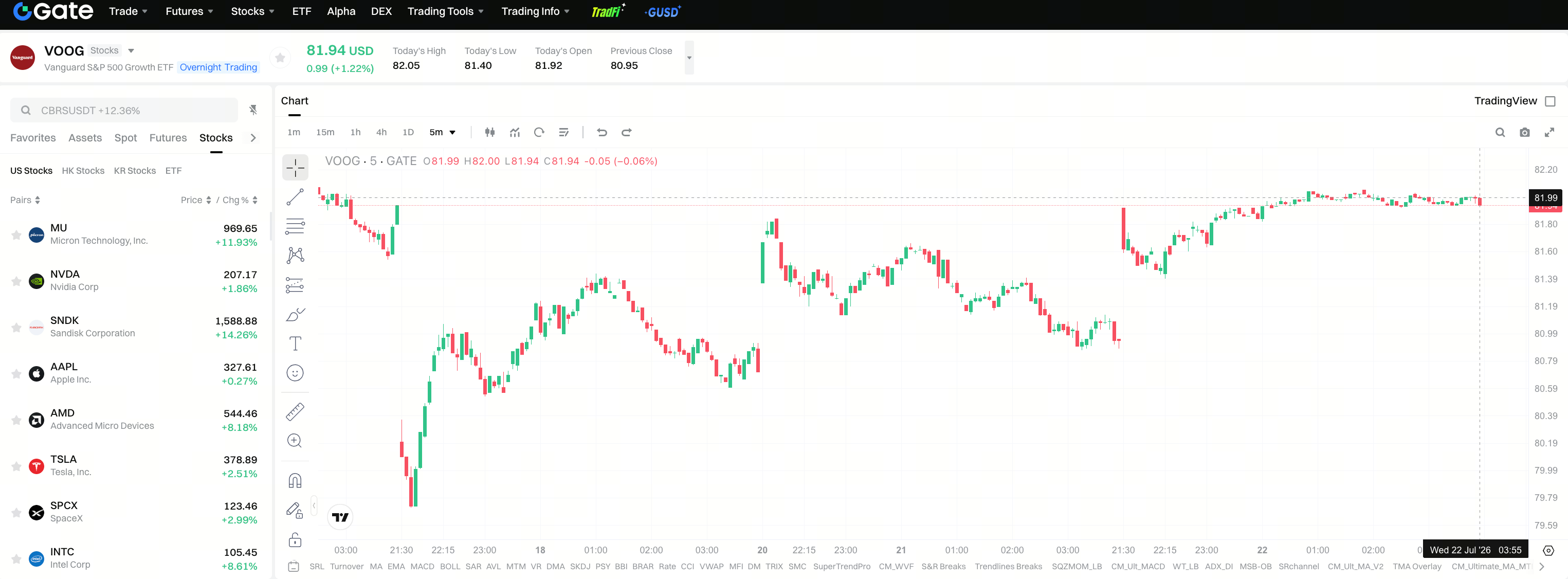
Open Gate Stocks · VOOG and enter VOOG in the search box. The page should show Vanguard S&P 500 Growth ETF or the matching stock name. Matching ticker and full fund name is the first control in the trading workflow—especially because Vanguard’s lineup includes several V-prefix, growth, or broad-market ETF tickers.
If search results also list VOO, VUG, or other growth/broad ETFs, prioritize ticker plus English full name. VOOG maps to Vanguard S&P 500 Growth ETF. If the page shows only an abbreviation, combine full name and market information so different index-boundary ETFs are not treated as the same instrument. VOOG vs VOO vs VUG explains index composition and style-exposure boundaries; at the search stage, the only required action is aligning ticker with full name.
Three search checks are enough before entering the order form: the ticker string is exactly VOOG; the displayed issuer or fund name matches Vanguard S&P 500 Growth ETF; and the page belongs to Gate Stocks rather than another product category. Failing any one of those checks means pause and re-search rather than filling quantity and price first.
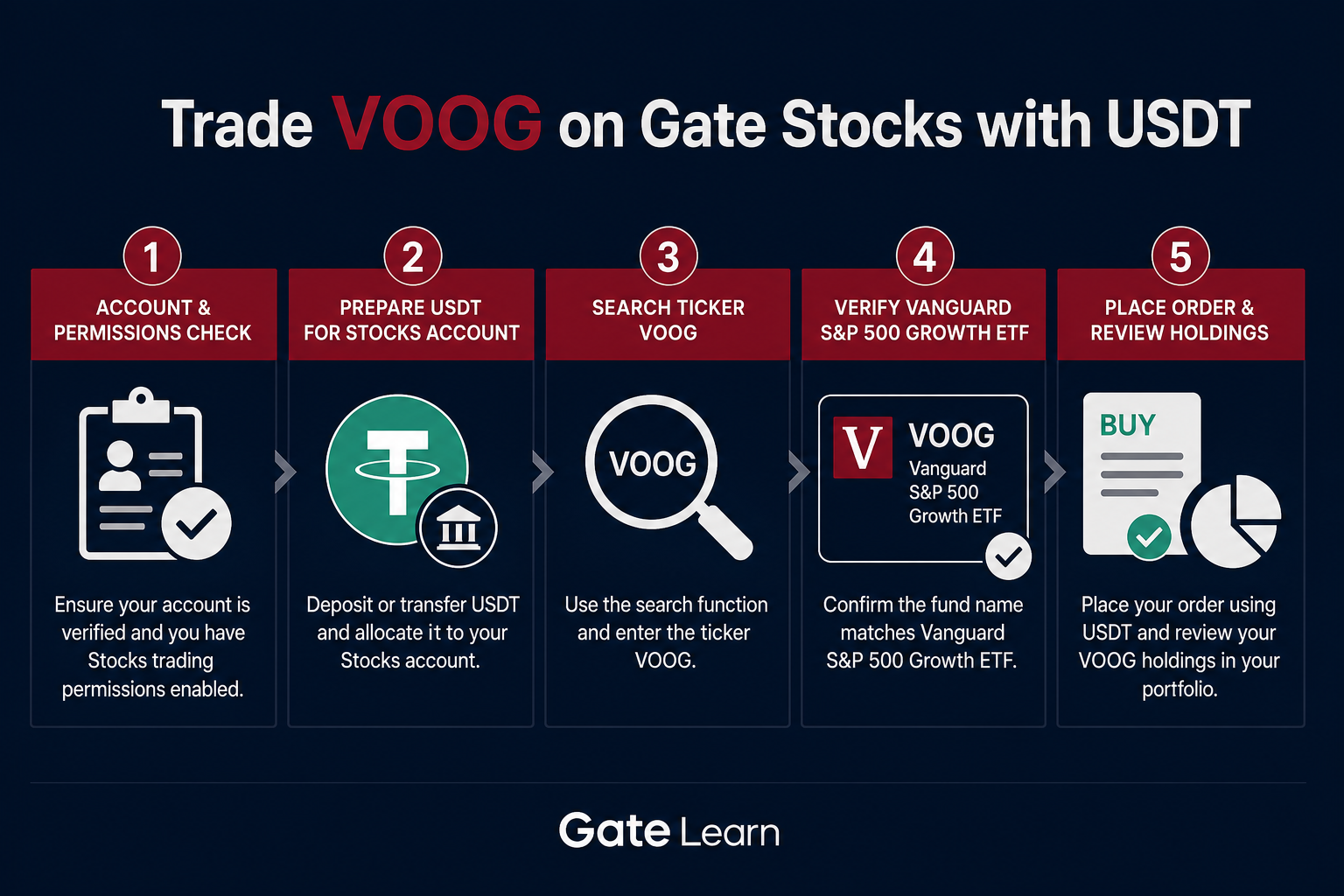 Figure 1. Gate Stocks USDT-to-VOOG flow: verify account, prepare USDT, search VOOG, confirm Vanguard S&P 500 Growth ETF, choose order type, and review holdings.
Step 3: How to Place a Buy/Trade Order for VOOG?
On the VOOG trading page, confirm in order: side (buy/sell), order type, quantity or notional, estimated fill amount, fees, and available account balance. Before submit, re-check stock name and ticker so a wrong instrument ID does not enter the fill record.
Common order types include Limit and Market. Limit orders emphasize a user-set price condition; Market orders emphasize execution at available market prices. Neither type is universally better; the difference is execution logic, fill speed, and price-control method.
| Order type |
Verification focus |
Possible outcome |
| Limit |
Price, quantity, time-in-force status |
May remain unfilled if the price is not triggered |
| Market |
Available balance, market liquidity |
Fill price may differ from the estimate |
| Partial fill |
Filled quantity, remaining open size |
Holdings and available balance update together |
The table separates order type from order status. Before submit, the confirmation dialog, fee notices, and order side are the last verification points.
After submission, check open orders, fill history, or holdings, and confirm average fill price, quantity, fees, and ticker VOOG are consistent. ETF holdings display may differ from spot crypto assets; review ticker, shares, and order history together.
Post-submit review closes the loop that search and order entry started. An open Limit order that has not filled is not the same as a completed buy; a partial fill updates holdings while leaving residual size in the order list. Reconciling those states against available USDT prevents treating unfinished orders as finished positions.
What Fees and Order Rules Need Confirmation When Trading VOOG?
Stock trading pages usually show trading fees, spreads, execution price, minimum trade size, session hours, and related notices. Product and region rules can differ, so fees and order rules follow page display.
When checking costs, separate two layers. One is the fund-level expense ratio: per Vanguard’s product page disclosure, VOOG’s expense ratio is about 0.07%, describing management and related fees charged against fund net assets. The other is platform trading fees, bid–ask spreads, and order execution costs, which follow Gate Stocks page fields. The two numbers describe different stages and cannot substitute for each other.
Beyond listed trading fees, watch execution cost. Market orders may fill away from the estimate when liquidity is thin; Limit orders may sit unfilled for a long time if price conditions are not met. Trading fees, spreads, minimum size, and session fields should be reviewed alongside risk checks rather than reading quote numbers alone.
Session and minimum-size rules matter as much as fee percentages. U.S. equity session windows on Gate Stocks follow page notices and may differ from 24/7 crypto spot habits. An order that looks correctly sized can still be rejected or remain inactive if it falls outside the allowed session or below the minimum unit shown on the VOOG page.
What Risks Should Be Understood Before Buying/Trading VOOG?
Trading-workflow risk and ETF-structure risk need separate framing. Workflow risks include ticker mix-ups (for example, placing VOO or VUG instead of VOOG), misreading order types, unclear fee rules, session limits, and liquidity changes. Structure and market risks come from growth-style volatility, index weight concentration, tracking difference, and display or settlement differences between USDT funding readings and stock pricing.
| Check dimension |
Typical content |
Purpose of the check |
| Fund expense ratio vs platform fees |
~0.07% expense ratio, trading fees, spreads |
Separate fund cost from execution cost |
| Instrument ID |
VOOG vs nearby tickers such as VOO / VUG |
Avoid buying the wrong ETF stock |
| Style and market |
Growth factor, valuation and earnings-expectation swings |
Understand exposure source, not order steps |
| Tracking and execution |
Cash, rebalancing, order and session rules |
Separate NAV path differences from page execution risk |
The table combines fee rules, operational risk, and ETF structure variables into one checklist. VOOG is a passive ETF stock tracking the S&P 500 Growth Index; a “growth” label alone is not a complete check. Concentration in large growth names can amplify drawdowns when valuation or earnings expectations shift, while tracking difference can leave NAV paths slightly apart from the index even when the fund aims for full replication. Risk notes identify variable sources and do not constitute buy or sell advice.
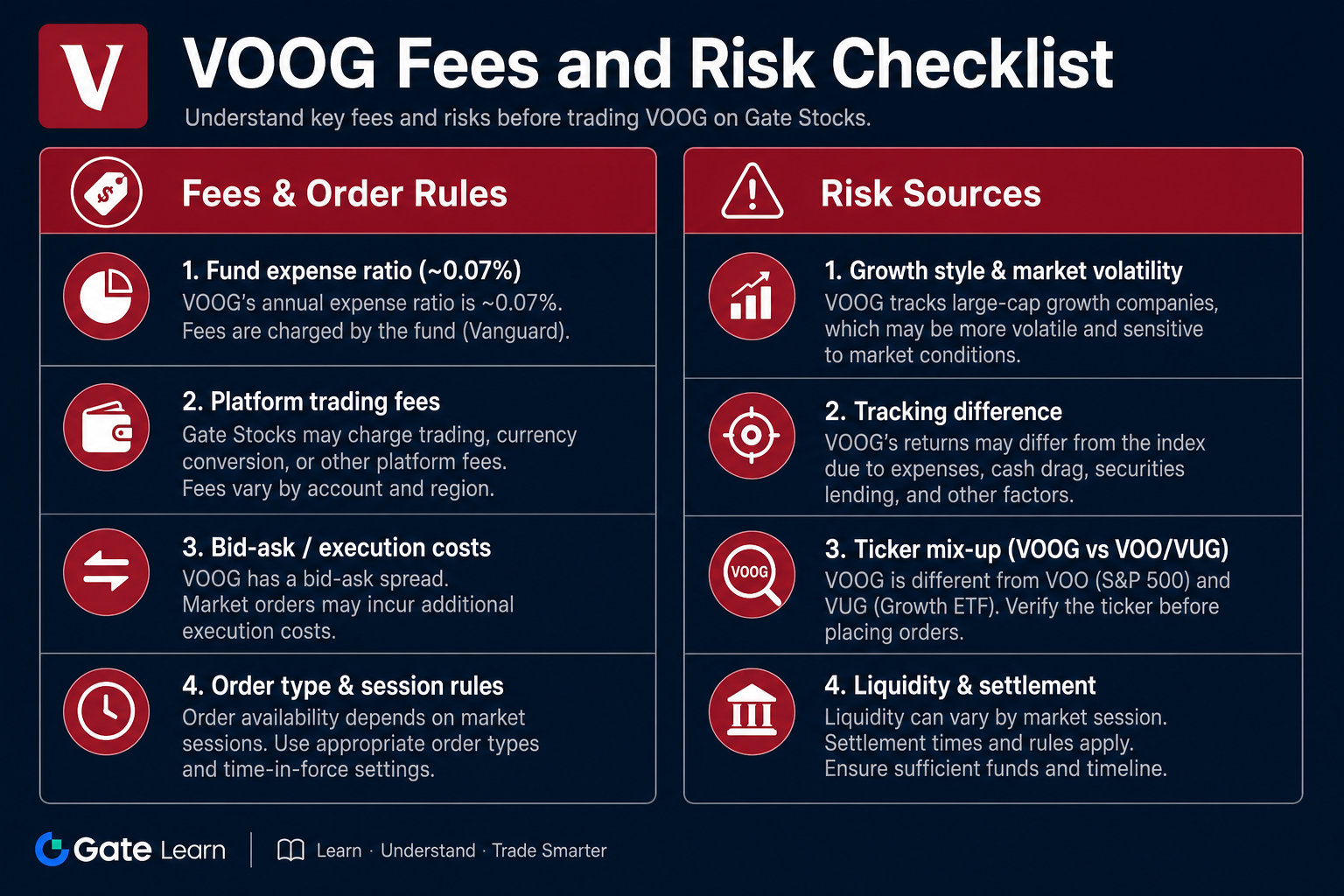 Figure 2. VOOG fees and risk checklist: separate fund expense ratio from platform trading fees, and check growth-style volatility, tracking difference, and nearby-ticker mix-ups independently.
Summary
Trading Vanguard S&P 500 Growth ETF (VOOG) with USDT on Gate Stocks is standardized process execution: prepare account and USDT, search ticker VOOG, verify the stock detail page, choose an order type, confirm fee rules, then review holdings after the fill. The trading page answers operational questions; index boundaries and style-risk checklists answer instrument understanding. Keep those two layers separate.
FAQ
How to Buy VOOG with USDT on Gate?
Confirm Stocks trading permissions and that USDT sits in a balance usable for stock orders, then search ticker VOOG on Gate Stocks and verify Vanguard S&P 500 Growth ETF. Choose an order type, submit, and after the fill review ticker, quantity, and fees in holdings and order history.
What Is VOOG?
VOOG is the trading ticker for Vanguard S&P 500 Growth ETF, a U.S.-listed ETF stock issued by Vanguard. The product tracks the S&P 500 Growth Index and provides passive exposure to the growth-style side of S&P 500 constituents. It is not a single-company stock and not a crypto token.
What Are the Risks of Trading VOOG?
Main risks include growth-style and market volatility, style tilt from concentrated index weights, ETF tracking difference versus the index, and execution risks such as ticker mix-ups, order-rule misreads, and fee-display differences. Structure variables and platform execution rules should be checked separately.
What Is the Difference Between VOOG and VOO?
VOO tracks the full S&P 500, covering large-cap growth, value, and other styles; VOOG tracks only the growth-style slice (S&P 500 Growth). Both sit in the U.S. large-cap equity universe, but index boundaries differ. At search and order entry, verify each product by ticker and full name.
What Is VOOG’s Expense Ratio?
Per Vanguard’s product page disclosure, VOOG’s expense ratio is about 0.07%. That figure is a fund expense-ratio disclosure describing management and related fund-level costs. Platform trading fees, bid–ask spreads, and order execution costs must be checked separately on Gate Stocks page fields; the two should not be treated as the same number.
How to Search for VOOG on Gate Stocks?
Enter ticker VOOG in the Gate Stocks search box; the page should show Vanguard S&P 500 Growth ETF and related market information. If VOO, VUG, or other nearby ETFs appear, match ticker and English full name so products with different index boundaries are not selected by mistake.